
Polymetric
Polymetric sequencing on iPad
Run a 16-step rhythm against a 5-step melody and they meet again only every 80 steps. Oxidzr lets almost everything have its own length and speed, so short patterns can keep recombining for a long time.
How it works
When two loops have different lengths, they line up again after the least common multiple of the two: 16 and 5 every 80 steps, 16 and 12 every 48. Add a third length of 3 and 16, 5 and 3 come round together only every 240 steps, fifteen bars of sixteenths. Every combination in between is a variation you didn’t have to write.
Oxidzr has several places to do this, from simple to deep.
Matriceal: independent sequencing lanes
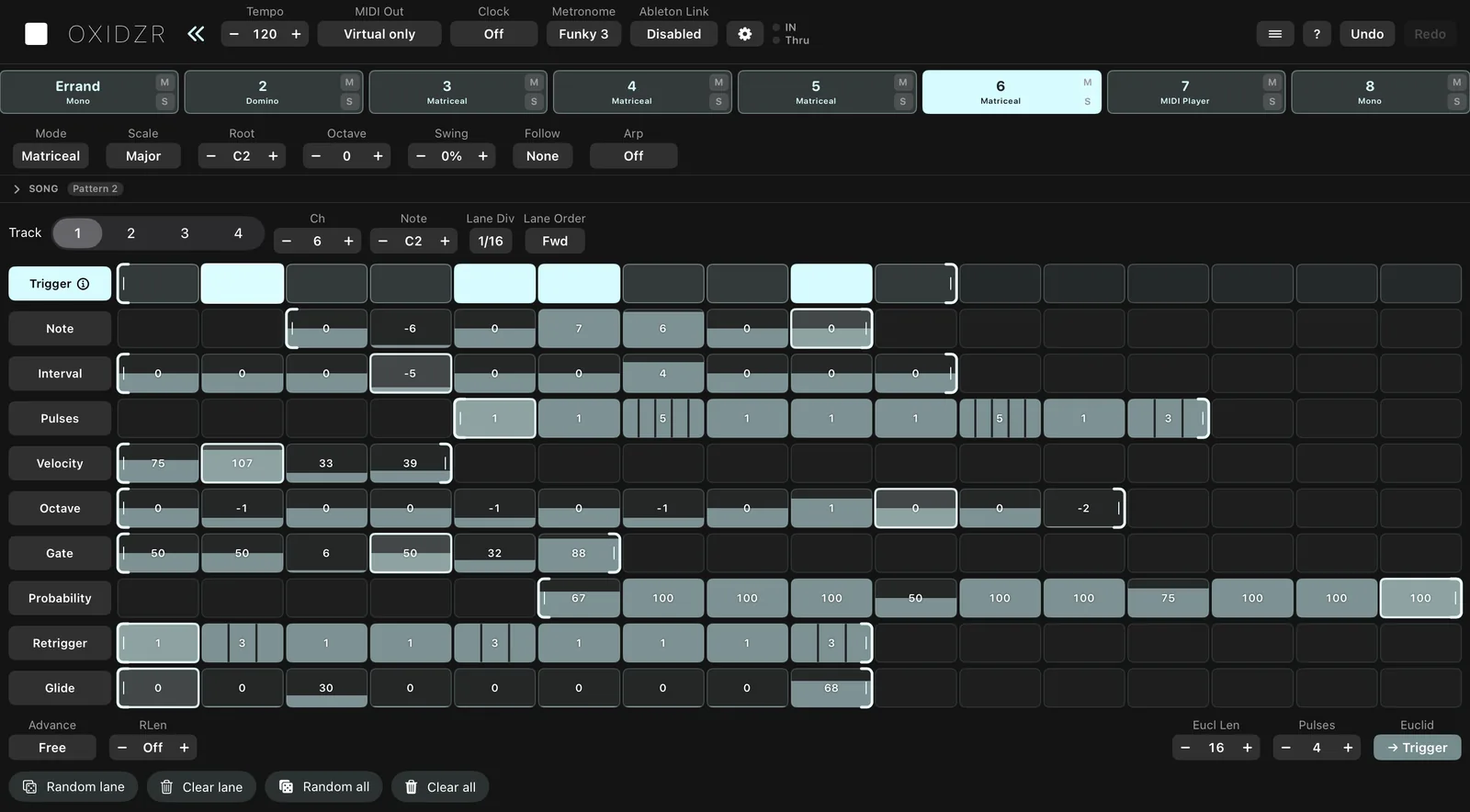
Matriceal builds a part from separate lanes instead of from notes. The Trigger lane is the rhythm. Every other lane holds one property: Note, Interval, Pulses, Velocity, Octave, Gate, Probability, Retrigger and Glide. When a trigger fires, the note is put together from whatever value each lane is on at that moment.
A first polymetric pattern:
- Set a sequencer’s Mode to Matriceal. Light a few steps on the Trigger lane, or use the Euclid generator: Eucl Len 16, Pulses 5, → Trigger.
- Give the Note lane a few different values, then drag its right bracket in to 5 steps.
- Shorten Velocity to 3 steps and Octave to 7.
- Press play and watch each lane’s playhead drift against the others.
Ways to shape it:
- Lane Div runs a lane at its own speed: a Note lane at 1/8 changes pitch half as often as a 1/16 rhythm.
- Lane Order plays a lane Rev, Ping, Rnd, Pedal or QRnd.
- Interval adds to a running total each time a note plays, so the line climbs or falls, wrapping round at Bound.
- Advance: Trigger moves the value lanes only when a note plays, so no value is skipped when the rhythm is sparse.
- RLen brings every lane back to its first step after a set number of trigger steps. Lanes of 5, 6 and 7 with RLen 16 repeat every 16 steps.
Each Matriceal sequencer has four tracks, each with its own lanes, channel and base note, all playing at once.
Domino: separate rhythm and melody
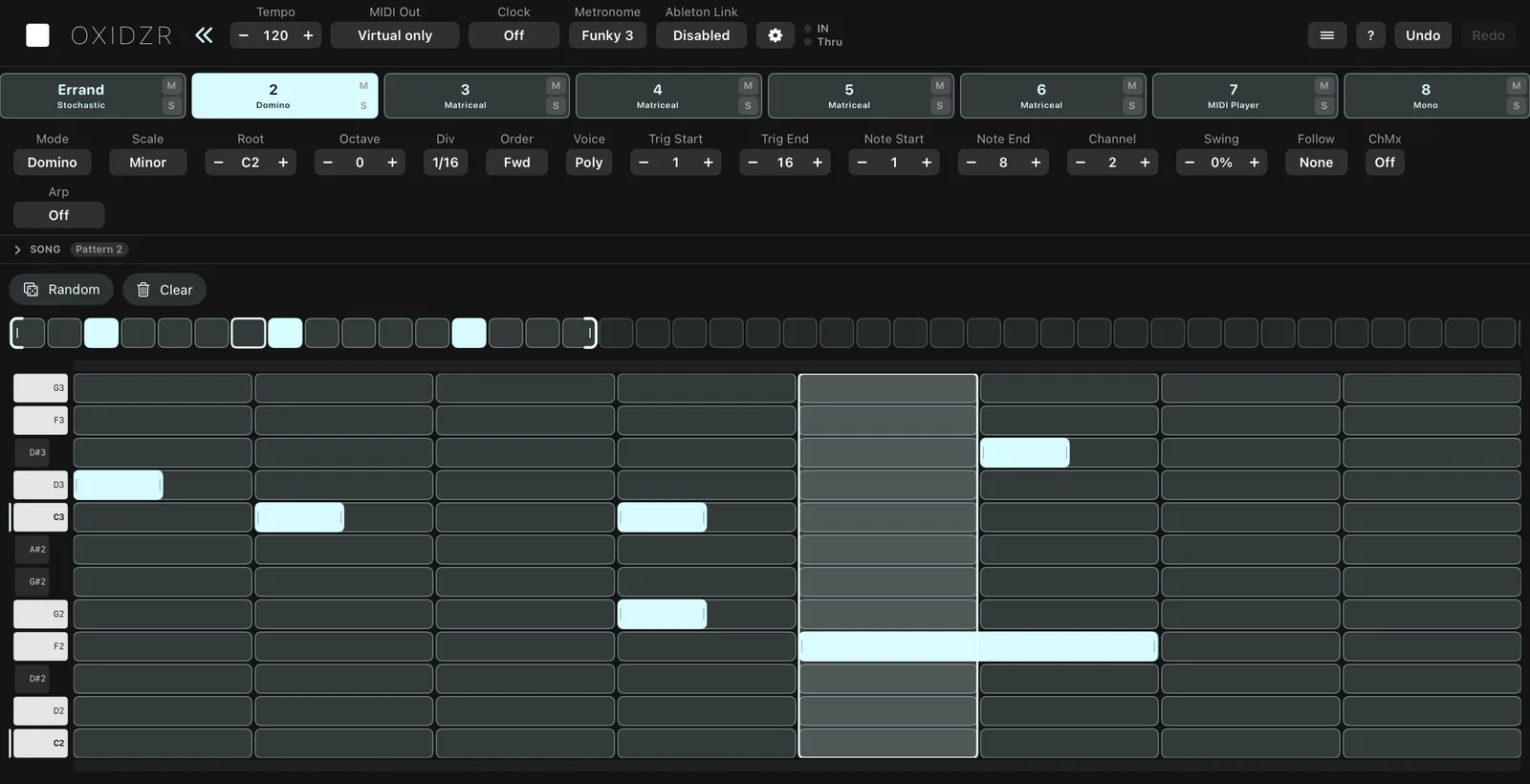
Domino is the most direct way to hear polymeter in a melody. A trigger row of up to 64 pads decides when notes play; a note layer of up to 32 steps decides which. Each trigger plays the next note.
- Set Mode to Domino. Light some triggers in the default 16.
- Put 5 notes on the note layer and set Note End to 5.
- The melody keeps its order but starts on a different beat each bar.
A trigger with Repeats runs quickly through the next few notes. A trigger with Prob below 100% makes the melody wait instead of losing a note. Tap Random for a new rhythm without touching the notes.
Multitrack: drum lanes of their own lengths
In Multitrack each of the 8 tracks has its own Start, End, Div and Order. Euclidean Apply writes an evenly spread rhythm of any length into a track:
- A kick over 16 steps, a percussion part of 5 pulses over 12, a hat at 1/16T: three loops that phase against each other.
- Skip on a step takes it out of that track’s loop only, making the track one step shorter.
Everywhere else
- Sequencer lengths: every sequencer in a step mode has its own Start and End. A 12-step Mono bass under a 16-step Chord part cycles every 48 steps.
- Mod lanes: each sequencer’s 8 mod lanes have their own length, Div and order, so a 5-step filter CC drifts across a 16-step line.
- Saga: stages of any duration from 1 to 16 steps. The pattern is as long as the stages add up to, so one longer stage moves everything after it.
Keeping it musical
- In key: Matriceal’s Note and Interval lanes, Domino and Saga all step through the sequencer’s scale.
- On the bar: pattern switches and the chain always land on 4/4 bar lines, whatever the loops are doing, so a drifting part still changes on the downbeat.
- Follow: a drifting line can follow a Chord sequencer’s harmony.
Details for each mode: Matriceal, Domino, Multitrack.